


Contacts and Clients
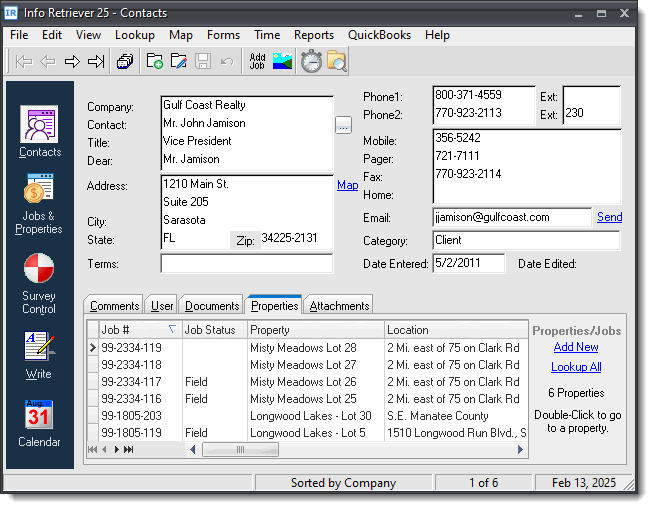
Keep track of your contacts and clients. Along with standard contact information, the contact view also contains a list of properties for each contact as well as a list of documents that have been written to the contact with the built-in word processor. Eight blank user fields are also provided for you to use as you choose.
- Keep track of important contact information.
- Easily find contacts by a variety of search methods.
- Look up a contact's address in Google Maps.
- Keep unlimited notes for each contact.
- Keep a list of properties or jobs for each contact.
- View a list of correspondence with each contact.
- Scan and save documents and photographs for each contact.
Jobs List (see screen shot)
Info-Retriever keeps a list of the jobs and properties for each contact. To quickly go to the job, just double-click it.
 Click for large version
Unlimited Notes
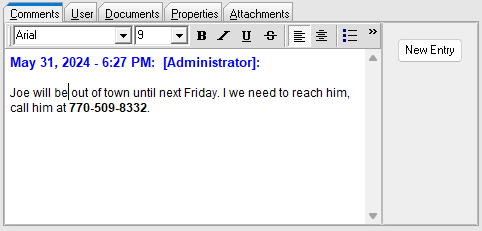
Enter unlimited notes for each contact. Each new entry can be stamped with the current date and time along with the user that is entering the note. The comments fields are fully searchable.
- Keep track of phone conversations and meetings.
- Stamp each entry with the current date and user.
File Attachments
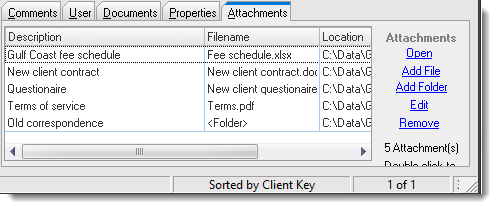
Keep a list of important documents and other files for each contact. To open a document, just double-click its entry in the list.
You can also attach folders for added convenience.
Contact Fields
Below is a list of data that can be stored with each contact.
- Company Name
- Contact Name
- Title
- Salutation
- Address
- City, State, Zip
- Terms
- Six phone numbers
- Email address
- Category
- Date Entered
- Comments (unlimited size)
- List of documents
- List of properties/jobs
- List of files, including PDF files, spreadsheets, or any other file on your computer.
- Scanned images
- 8 Extra fields for you to rename and use as desired