


- Manage property & job information.
- Keep unlimited notes for each property or job.
- Search for jobs by lat/lon.
- Plot jobs on a map.
- Link properties and jobs to a contact or client.
- Search and sort on virtually any field in the property view.
- Scan and save deeds, field notes, surveys, and more with each property.
- Attach drawings, field notes and other files.
- Create location maps of your jobs in Google Earth. Learn More
 Click for large version
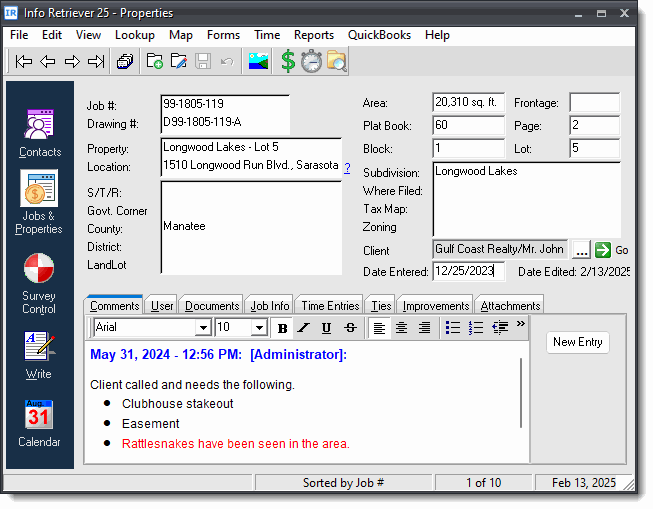
Unlimited Notes
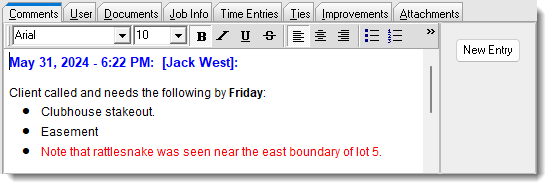
Enter notes and comments of unlimited size for each job. Each entry is stamped with the user and current date and time. The comments that you enter into a note field are fully searchable.
- Keep track of special instructions and other job info.
- Stamp each entry with the current date and user.
 Click for large version
File Attachments
Keep a list of files for each job. These could be AutoCAD drawings, field files, scanned maps, aerial photos, proposals and more. To open a document, just double-click its entry in the list.
You can also attach folders for added convenience.
 Click for large version
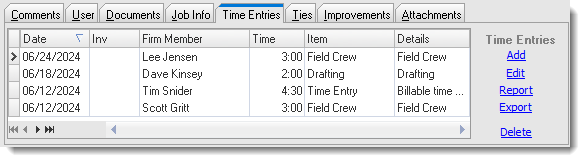
Time Entries
Easily record the time that you spend on your jobs, and then add the time to an invoice for billing. When you look up a job, you can see a list of all the time entries right in the Jobs window.
 Click for large version
Extended Job Information
Extended job information can be entered on the "Job Info" tab.
 Click for large version
Job & Property Fields
Below is a list of data that can be stored with each job.
- Job number
- Drawing number
- Property name
- Property location
- Section/Township/Range
- County
- District
- Land-Lot
- Area
- Frontage
- Plat book and page
- Block and lot
- Subdivision
- Where filed
- Tax map
- Zoning
- Client
- Date entered
- Comments (unlimited size)
- Improvements (unlimited size)
- Description of work to be done
- Date needed
- Assigned to
- Requested by
- Job status
- Certify to
- Job contact
- Job phone
- Job fax
- Job email
- Job address
- Job city, state, zip
- Job Extra (4 extra fields for you to use as desired)
- Job notes
- Benchmark tie
- Monument tie
- Time entries
- Documents
- Files, including drawing files, field notes, or any other file on your computer.
- Scanned images
- 8 Extra fields for you to rename and use as desired