


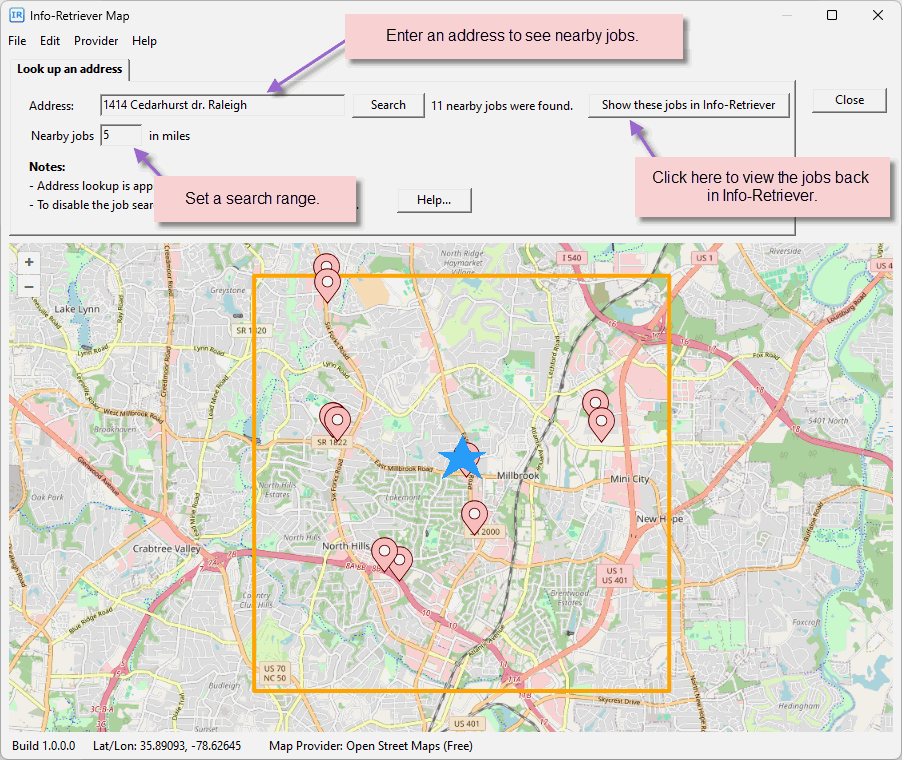
Info-Retriever now has built-in map features that let you do the following.
- Look up an address.
- Show nearby jobs on a map.
- Find the lat/lon for a job location.
- Show your job and control searches on a map.
* To use these features, jobs must be saved with latitude/longitude information. However if you don't have a lat/lon, you can easily look it up right in Info-Retriever.
 Click for large version
Send locations to your field crew!
Want to share job or control locations with your field crew? It's easy with Info-Retriever and Google Earth.
- Look up the jobs or control in Info-Retriever.
- Click the File menu, then Export, then to a KML file.
- Now email the KML file to the field crew. When they click on the attachment, the jobs will appear in Google Earth!
* Google Earth must be installed on the phone and is available in both the Apple App Store and Google Play.
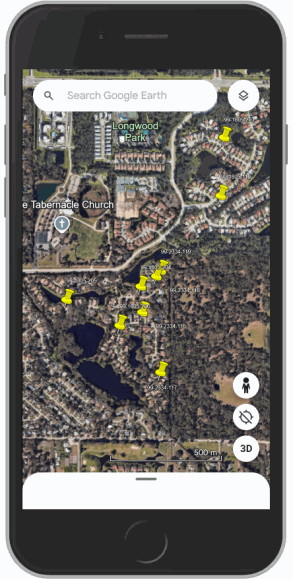
Create location maps in Google Earth
You can also create location maps in the desktop version of Google Earth.
- Create color coded locations.
- Click a location for extended information.
- Share locations with others via easy-to-use KML files.
